

一、注入
注入攻击漏洞,例如SQL,OS 以及 LDAP注入。这些攻击发生在当不可信的数据作为命令或者查询语句的一部分,被发送给解释器的时候。攻击者发送的恶意数据可以欺骗解释器,以执行计划外的命令或者在未被恰当授权时访问数据。
- Xpath注入
- 漏洞利用演示
页面功能:通过用户名查询对应用户的电话号码。用户名和电话号码存储在XML文件中。XML文件内容如下:
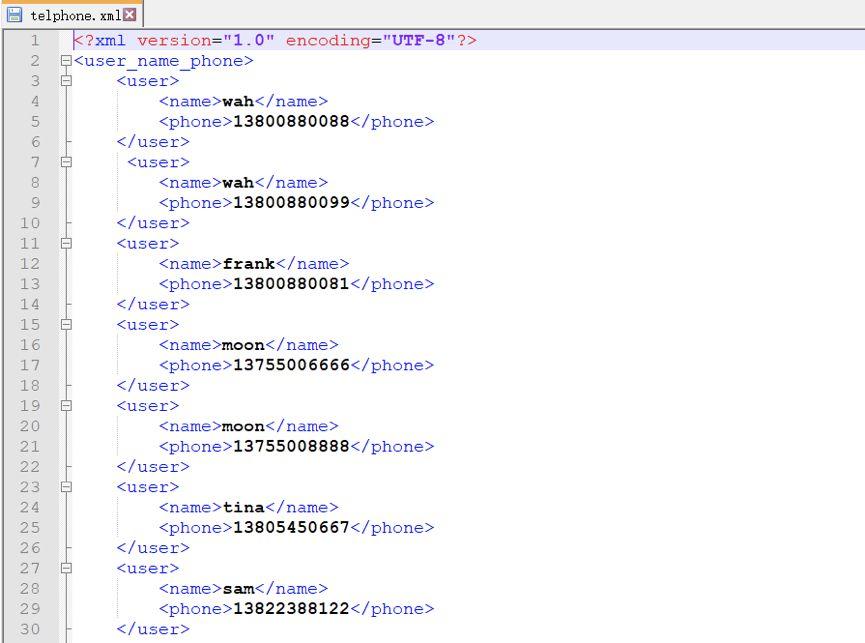
正常查询和恶意利用结果对比如下:


- 漏洞危害说明
用户输入的字符被用于XPATH的查询表达式中,这些恶意编造的字符会获取XML文件中非授权数据,从而用于执行身份验证、数据使用或者其它操作等;
- 漏洞代码分析
publicvoiddoPost(HttpServletRequest request, HttpServletResponse response) throwsServletException, IOException {File f= new File("D:\Tomcat-7.0.55\webapps\owasp\xml\telphone.xml");xpath_bad(request,response, f);}privatevoidxpath_bad(HttpServletRequest request, HttpServletResponseresponse, File f) throws ServletException,IOException {Stringlname = request.getParameter("username1");String xpath = "/user_name_phone/user[name='" + lname + "']/phone";SAXReadersaxReader = new SAXReader();Documentdocument = null;try {document= saxReader.read(f);} catch(DocumentException e) {e.printStackTrace();}Elementroot = document.getRootElement();List<?> list =root.selectNodes(xpath);Iterator>iter = list.iterator();Stringstr = "";if(!iter.hasNext()) {str= "用户不存在!";request.setAttribute("xname",lname.toString());request.setAttribute("xphone",str.toString());} else {while(iter.hasNext()) {Elementelement = (Element) iter.next();Stringtelno = element.getText();Stringtelname = element.getParent().elementText("name");str= str + telname.toString() + ":" +telno.toString() + "; ";}request.setAttribute("xname",lname.toString());request.setAttribute("xphone",str.toString());}request.getRequestDispatcher("/jsp/xpath_sqldemo.jsp").forward(request, response);}
-
漏洞代码修复
- 用户输入的XPATH查询数据,在服务端正式处理前,进行合法性验证;
- 对用户输入数据中的单引号和双引号进行转义,避免用户恶意输入的单引号或双引号被当成XPATH查询表达式的分隔符解释;
- 屏蔽XPATH查询时的出错信息;
- 参数化XPath查询:将需要构建的XPath查询表达式,以变量的形式表示,变量不是可以执行的脚本。
防止Xpath注入可使用:
a.使用ESAPI提供的方法对输入进行验证
publicvoiddoPost(HttpServletRequest request, HttpServletResponse response) throwsServletException, IOException {File f = new File("D:\Tomcat-7.0.55\webapps\owasp\xml\telphone.xml");xpath_good_esapi(request,response, f);}
privatevoidxpath_good_esapi(HttpServletRequest request,HttpServletResponse response, Filef) throws ServletException, IOException { Stringlname = request.getParameter("username1"); lname = ESAPI.encoder().encodeForXPath(lname); Stringxpath = "/user_name_phone/user[name='" + lname + "']/phone"; SAXReadersaxReader = new SAXReader(); Documentdocument = null; try { document= saxReader.read(f); } catch(DocumentException e) { e.printStackTrace(); } Elementroot = document.getRootElement(); List>list = root.selectNodes(xpath); Iterator>iter = list.iterator(); Stringstr = ""; if(!iter.hasNext()) { …… } else { …… } request.getRequestDispatcher("/jsp/xpath_sqldemo.jsp").forward(request, response); }
b.自定义校验方法过滤特殊字符
privatevoidxpath_good(HttpServletRequest request,HttpServletResponse response, File f) throwsServletException,IOException {Stringlname = request.getParameter("username1");Stringxpath = "/user_name_phone/user[name='" + lname + "']/phone";try {if (checkValueForXpathInjection(lname)) {……}else{……}} catch (Exceptione) {e.printStackTrace();}}publicboolean checkValueForXpathInjection(String value) throws Exception {boolean isValid = true;if ((value != null) &&!"".equals(value)) {StringxpathCharList = "()='[]:,*/ ";StringdecodedValue = URLDecoder.decode(value, Charset.defaultCharset().name());for (char c :decodedValue.toCharArray()) {if(xpathCharList.indexOf(c) != -1) {isValid= false;break;}}}