
-
Ceph 对象存储多站点复制:第六部分
在本系列的上一篇文章中,我们讨论了多站点同步策略并分享了粒度存储桶双向复制的实践示例。在今天的博客第六部分中,我们将配置其他多站点同步策略,包括从一个源到多个目标存储桶的单向复制。
单向桶同步
在上一篇文章中,我们探讨了具有双向配置的存储桶同步策略。现在,让我们通过一个示例来了解如何启用两个存储桶之间的单向同步。在示例中,我们目前将区域组同步策略设置为
allowed,并在zonegroup级别配置了双向流。通过区域组同步策略允许我们以每个存储桶的粒度配置复制,我们可以从单向复制配置开始。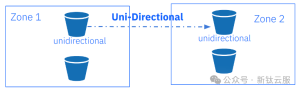
我们创建单向存储桶,然后创建一个 ID 为
unidirectional-1同步组,然后将状态设置为Enabled。当我们将同步组策略的状态设置为enabled时,一旦管道应用到存储桶,复制就会开始。[root@ceph-node-00 ~]# aws --endpoint https://object.s3.zone1.dan.ceph.blue:443 s3 mb s3://unidirectional make_bucket: unidirectional [root@ceph-node-00 ~]# radosgw-admin sync group create --bucket=unidirectional --group-id=unidirectiona-1 --status=enabled
一旦同步组就位,我们需要为我们的存储桶创建一个管道。在此示例中,我们指定源区域和目标区域:源为
zone1,目标为zone2。这样,我们就为bucketunidirectional创建了一个单向复制管道,数据仅在一个方向复制:zone1—>zone2。[root@ceph-node-00 ~]# radosgw-admin sync group pipe create --bucket=unidirectional --group-id=unidirectiona-1 --pipe-id=test-pipe1 --source-zones='zone1' --dest-zones='zone2'通过
sync info,我们可以检查bucket复制的流程。可以看到,当我们从zone1中的节点运行命令时,sources 字段为空,并且我们没有从外部源接收数据。毕竟,从我们运行命令的区域,我们正在进行单向复制,因此我们将数据发送到目的地。我们可以看到unidirectional存储桶的源是zone1,目标是zone2。[root@ceph-node-00 ~]# radosgw-admin sync info --bucket unidirectional { "sources": [], "dests": [ { "id": "test-pipe1", "source": { "zone": "zone1", "bucket": "unidirectional:89c43fae-cd94-4f93-b21c-76cd1a64788d.34955.1" }, "dest": { "zone": "zone2", "bucket": "unidirectional:89c43fae-cd94-4f93-b21c-76cd1a64788d.34955.1" …. }
当我们在
zone2中运行相同的命令时,我们会看到相同的信息,但源字段显示从zone1接收数据。单向存储桶zone2未发送任何复制数据,这就是sync info命令的输出中目标字段为空的原因。[root@ceph-node-04 ~]# radosgw-admin sync info --bucket unidirectional { "sources": [ { "id": "test-pipe1", "source": { "zone": "zone1", "bucket": "unidirectional:66df8c0a-c67d-4bd7-9975-bc02a549f13e.36430.1" }, "dest": { "zone": "zone2", "bucket": "unidirectional:66df8c0a-c67d-4bd7-9975-bc02a549f13e.36430.1" }, …. "dests": [],
一旦我们的配置准备就绪,我们就可以进行一些检查,看看一切是否都按预期工作。让我们将三个文件放入
zone1:[root@ceph-node-00 ~]# for i [1..3] do ; in aws --endpoint https://object.s3.zone1.dan.ceph.blue:443 s3 cp /etc/hosts s3://unidirectional/fil${i} upload: ../etc/hosts to s3://unidirectional/fil1 upload: ../etc/hosts to s3://unidirectional/fil2 upload: ../etc/hosts to s3://unidirectional/fil3
我们可以检查它们是否已同步到
zone2:[root@ceph-node-00 ~]# aws --endpoint https://object.s3.zone2.dan.ceph.blue:443 s3 ls s3://unidirectional/ 2024-02-02 17:56:09 233 fil1 2024-02-02 17:56:10 233 fil2 2024-02-02 17:56:11 233 fil3
现在让我们检查一下当我们将一个对象放入
zone2时会发生什么。我们不应该看到文件复制到zone1,因为我们的存储桶的复制配置是单向的。[root@ceph-node-00 ~]# aws --endpoint https://object.s3.zone2.dan.ceph.blue:443 s3 cp /etc/hosts s3://unidirectional/fil4 upload: ../etc/hosts to s3://unidirectional/fil4 [root@ceph-node-00 ~]# aws --endpoint https://object.s3.zone2.dan.ceph.blue:443 s3 ls s3://unidirectional/ 2024-02-02 17:56:09 233 fil1 2024-02-02 17:56:10 233 fil2 2024-02-02 17:56:11 233 fil3 2024-02-02 17:57:49 233 fil4
一段时间后,我们检查了 zone1,发现该文件不存在,这意味着它没有按预期从 zone2 复制。
[root@ceph-node-00 ~]# aws --endpoint https://object.s3.zone1.dan.ceph.blue:443 s3 ls s3://unidirectional
2024-02-02 17:56:09        233 fil1
2024-02-02 17:56:10        233 fil2
2024-02-02 17:56:11        233 fil3
在此示例中,我们将通过添加名为
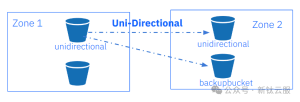
backupbucket新复制目标存储桶来修改之前的单向同步策略。一旦我们设置了同步策略,上传到zone1中unidirectional存储桶的每个对象都将被复制到zone2中unidirectional存储桶和backupbucket中。首先,让我们创建存储桶
backupbucket:[root@ceph-node-00 ~]# aws --endpoint https://object.s3.zone2.dan.ceph.blue:443 s3 mb s3://backupbucket make_bucket: backupbucket
我们将向现有同步组策略添加一个名为
backupbucket的新管道。我们在之前的unidirectional示例中创建了组同步策略。再次,我们指定源区域和目标区域,因此我们的同步将是单向的。主要区别在于,现在我们使用
--dest-bucket参数指定名为backupbucket的目标存储桶。[root@ceph-node-00 ~]# radosgw-admin sync group pipe create --bucket=unidirectional --group-id=unidirectiona-1 --pipe-id=test-pipe2 --source-zones='zone1' --dest-zones='zone2' --dest-bucket=backupbucket再次,让我们检查同步信息输出,它向我们显示了我们已配置的复制流的表示。源字段为空,因为在
zone1中我们没有从任何其他源接收数据。在目的地,我们现在有两个不同的pipes。我们在前面的示例中创建的第一个test-pipe1。第二个管道将backupbucket设置为zone2中的复制目标。[root@ceph-node-00 ~]# radosgw-admin sync info --bucket unidirectional { "sources": [], "dests": [ { "id": "test-pipe1", "source": { "zone": "zone1", "bucket": "unidirectional:66df8c0a-c67d-4bd7-9975-bc02a549f13e.36430.1" }, "dest": { "zone": "zone2", "bucket": "unidirectional:66df8c0a-c67d-4bd7-9975-bc02a549f13e.36430.1" }, "params": { "source": { "filter": { "tags": [] } }, "dest": {}, "priority": 0, "mode": "system", "user": "user1" } }, { "id": "test-pipe2", "source": { "zone": "zone1", "bucket": "unidirectional:66df8c0a-c67d-4bd7-9975-bc02a549f13e.36430.1" }, "dest": { "zone": "zone2", "bucket": "backupbucket" }, "params": { "source": { "filter": { "tags": [] } }, "dest": {}, "priority": 0, "mode": "system", "user": "user1" } } ], "hints": { "sources": [], "dests": [ "backupbucket" ] },
让我们检查一下:在前面的示例中,我们的
zone1包含三个文件:[root@ceph-node-00 ~]# aws --endpoint https://object.s3.zone2.dan.ceph.blue:443 s3 ls s3://unidirectional/ 2024-02-02 17:56:09 233 fil1 2024-02-02 17:56:10 233 fil2 2024-02-02 17:56:11 233 fil3
在有四个文件的
zone2中,fil4不会复制到zone1因为复制是单向的。[root@ceph-node-00 ~]# aws --endpoint https://object.s3.zone2.dan.ceph.blue:443 s3 ls s3://unidirectional/ 2024-02-02 17:56:09 233 fil1 2024-02-02 17:56:10 233 fil2 2024-02-02 17:56:11 233 fil3 2024-02-02 17:57:49 233 fil4
让我们向
zone1添加另外三个文件。我们希望将它们复制到zone2中的unidirectional存储桶和backupbucket:[root@ceph-node-00 ~]# for i [5..7] do ; in aws --endpoint https://object.s3.zone1.dan.ceph.blue:443 s3 cp /etc/hosts s3://unidirectional/fil${i} upload: ../etc/hosts to s3://unidirectional/fil5 upload: ../etc/hosts to s3://unidirectional/fil6 upload: ../etc/hosts to s3://unidirectional/fil7 [root@ceph-node-00 ~]# aws --endpoint https://object.s3.zone1.dan.ceph.blue:443 s3 ls s3://unidirectional 2024-02-02 17:56:09 233 fil1 2024-02-02 17:56:10 233 fil2 2024-02-02 17:56:11 233 fil3 2024-02-02 18:03:51 233 fil5 2024-02-02 18:04:37 233 fil6 2024-02-02 18:09:08 233 fil7 [root@ceph-node-00 ~]# aws --endpoint http://object.s3.zone2.dan.ceph.blue:80 s3 ls s3://unidirectional 2024-02-02 17:56:09 233 fil1 2024-02-02 17:56:10 233 fil2 2024-02-02 17:56:11 233 fil3 2024-02-02 17:57:49 233 fil4 2024-02-02 18:03:51 233 fil5 2024-02-02 18:04:37 233 fil6 2024-02-02 18:09:08 233 fil7 [root@ceph-node-00 ~]# aws --endpoint http://object.s3.zone2.dan.ceph.blue:80 s3 ls s3://backupbucket 2024-02-02 17:56:09 233 fil1 2024-02-02 17:56:10 233 fil2 2024-02-02 17:56:11 233 fil3 2024-02-02 18:03:51 233 fil5 2024-02-02 18:04:37 233 fil6 2024-02-02 18:09:08 233 fil7
我们将所有对象复制到所有存储桶中——除了
fil4。这是满足预期的,因为文件已上传到zone2,并且我们的复制是单向的,因此从zone2到zone1没有同步。如果我们查询
backupbucketsync info会输出什么?此存储桶仅在另一个存储桶策略中引用,但存储桶backupbucket没有自己的同步策略:[root@ceph-node-00 ~]# ssh ceph-node-04 radosgw-admin sync info --bucket backupbucket { "sources": [], "dests": [], "hints": { "sources": [ "unidirectional:66df8c0a-c67d-4bd7-9975-bc02a549f13e.36430.1" ], "dests": [] }, "resolved-hints-1": { "sources": [ { "id": "test-pipe2", "source": { "zone": "zone1", "bucket": "unidirectional:66df8c0a-c67d-4bd7-9975-bc02a549f13e.36430.1" }, "dest": { "zone": "zone2", "bucket": "backupbucket" },
对于这种情况,我们使用hints ,因此即使备份没有直接参与
unidirectionalbucket同步策略,也会通过hint来引用。[!CAUTION]
请注意,在输出中,我们可以看到,存储桶
backupbucket间接找到了有关存储桶unidirectional信息,而不是从其自己的策略中发现:backupbucket本身的策略为空。存储桶同步策略注意事项
有一点需要注意,元数据始终会同步到其他区域,与存储桶同步策略无关。因此,每个用户和存储桶,即使未配置复制,也会显示在属于区域组的所有区域中。
举个例子,让我们创建一个名为
newbucket的新存储桶:[root@ceph-node-00 ~]# aws --endpoint http://object.s3.zone2.dan.ceph.blue:80 s3 mb s3://newbucket make_bucket: newbucket
我们确认此存储桶没有配置任何复制:
[root@ceph-node-00 ~]# radosgw-admin bucket sync checkpoint --bucket newbucket
Sync is disabled for bucket newbucket
但所有元数据都会同步到辅助区域,以便存储桶将出现在
zone2中。无论如何,桶内的数据都不会被复制。[root@ceph-node-00 ~]# aws --endpoint https://object.s3.zone2.dan.ceph.blue:443 s3 ls | grep newbucket 2024-02-02 02:22:31 newbucket
另一件需要注意的事情是,在为存储桶配置同步策略之前上传的对象不会同步到其他区域,直到我们在启用存储桶同步后上传对象。当我们将新对象上传到存储桶时,此示例会同步:
[root@ceph-node-00 ~]# aws --endpoint https://object.s3.zone1.dan.ceph.blue:443 s3 ls s3://objectest1/ 2024-02-02 04:03:47 233 file1 2024-02-02 04:03:50 233 file2 2024-02-02 04:03:53 233 file3 2024-02-02 04:27:19 233 file4 [root@ceph-node-00 ~]# ssh ceph-node-04 radosgw-admin bucket sync checkpoint --bucket objectest1 2024-02-02T04:17:15.596-0500 7fc00c51f800 1 waiting to reach incremental sync.. 2024-02-02T04:17:17.599-0500 7fc00c51f800 1 waiting to reach incremental sync.. 2024-02-02T04:17:19.601-0500 7fc00c51f800 1 waiting to reach incremental sync.. 2024-02-02T04:17:21.603-0500 7fc00c51f800 1 waiting to reach incremental sync.. [root@ceph-node-00 ~]# aws --endpoint https://object.s3.zone1.dan.ceph.blue:443 s3 cp /etc/hosts s3://objectest1/file4 upload: ../etc/hosts to s3://objectest1/file4 [root@ceph-node-00 ~]# radosgw-admin bucket sync checkpoint --bucket objectest1 2024-02-02T04:27:29.975-0500 7fce4cf11800 1 bucket sync caught up with source: local status: [00000000001.569.6, , 00000000001.47.6, , , , 00000000001.919.6, 00000000001.508.6, , , ] remote markers: [00000000001.569.6, , 00000000001.47.6, , , , 00000000001.919.6, 00000000001.508.6, , , ] [root@ceph-node-00 ~]# aws --endpoint https://object.s3.zone2.dan.ceph.blue:443 s3 ls s3://objectest1 2024-02-02 04:03:47 233 file1 2024-02-02 04:03:50 233 file2 2024-02-02 04:03:53 233 file3 2024-02-02 04:27:19 233 file4
当存储桶同步策略处于
allowed或forbidden状态时创建、修改或删除的对象,再次启用该策略时将不会自动同步。我们需要运行
bucket sync run命令来同步这些对象并使两个区域中的存储桶保持同步。例如,我们禁用存储桶objectest1的同步,并将几个对象放入zone1中,即使我们再次启用复制,这些对象也不会复制到zone2中。[root@ceph-node-00 ~]# radosgw-admin sync group create --bucket=objectest1 --group-id=objectest1-1 --status=forbidden [root@ceph-node-00 ~]# aws --endpoint https://object.s3.zone1.dan.ceph.blue:443 s3 cp /etc/hosts s3://objectest1/file5 upload: ../etc/hosts to s3://objectest1/file5 [root@ceph-node-00 ~]# aws --endpoint https://object.s3.zone1.dan.ceph.blue:443 s3 cp /etc/hosts s3://objectest1/file6 upload: ../etc/hosts to s3://objectest1/file6 [root@ceph-node-00 ~]# radosgw-admin sync group create --bucket=objectest1 --group-id=objectest1-1 --status=enabled [root@ceph-node-00 ~]# aws --endpoint http://object.s3.zone2.dan.ceph.blue:80 s3 ls s3://objectest1 2024-02-02 04:03:47 233 file1 2024-02-02 04:03:50 233 file2 2024-02-02 04:03:53 233 file3 2024-02-02 04:27:19 233 file4 [root@ceph-node-00 ~]# aws --endpoint https://object.s3.zone1.dan.ceph.blue:443 s3 ls s3://objectest1/ 2024-02-02 04:03:47 233 file1 2024-02-02 04:03:50 233 file2 2024-02-02 04:03:53 233 file3 2024-02-02 04:27:19 233 file4 2024-02-02 04:44:45 233 file5 2024-02-02 04:45:38 233 file6
为了使存储桶恢复同步,我们从目标区域使用
radosgw-admin sync run命令。[root@ceph-node-00 ~]# ssh ceph-node-04 radosgw-admin bucket sync run --source-zone zone1 --bucket objectest1 [root@ceph-node-00 ~]# aws --endpoint http://object.s3.zone2.dan.ceph.blue:80 s3 ls s3://objectest1 2024-02-02 04:03:47 233 file1 2024-02-02 04:03:50 233 file2 2024-02-02 04:03:53 233 file3 2024-02-02 04:27:19 233 file4 2024-02-02 04:44:45 233 file5 2024-02-02 04:45:38 233 file6
总结
在本系列的第六部分中,我们继续深入探讨了多站点同步策略,并通过实践示例展示了包括单源到多目标桶的单向复制在内的多种配置方案。

云和安全管理服务商